We are trying to set up a custom email relay, but the email settings in our Cetec admin section do not appear to include a field to enter the address or fully qualified name of the external mail server. Where can we enter this information so that Cetec knows what mail server to use instead of Sendgrid? We already tried going to Admin → Config Settings → Config Settings and searching through all available fields for keywords “email” and “server” but did not find anything appropriate.
Hey Steve,
If you’re trying to establish custom email settings you can do that here - Cetec ERP
Please note the alert at the top of that page if email sending is broken after establishing custom email settings.
Let me know if you have any additional questions!
Thanks,
Cetec ERP Support
I am working with Steve to get the custom email set up for his company. I followed the link you provided to the Email Settings page Cetec ERP . While it does show fields for most of the parameters needed to configure an external email server, an important one seems to be missing. I see no field to set the email server address. Where is that field, specifically? Please refer to the attached screenshot.
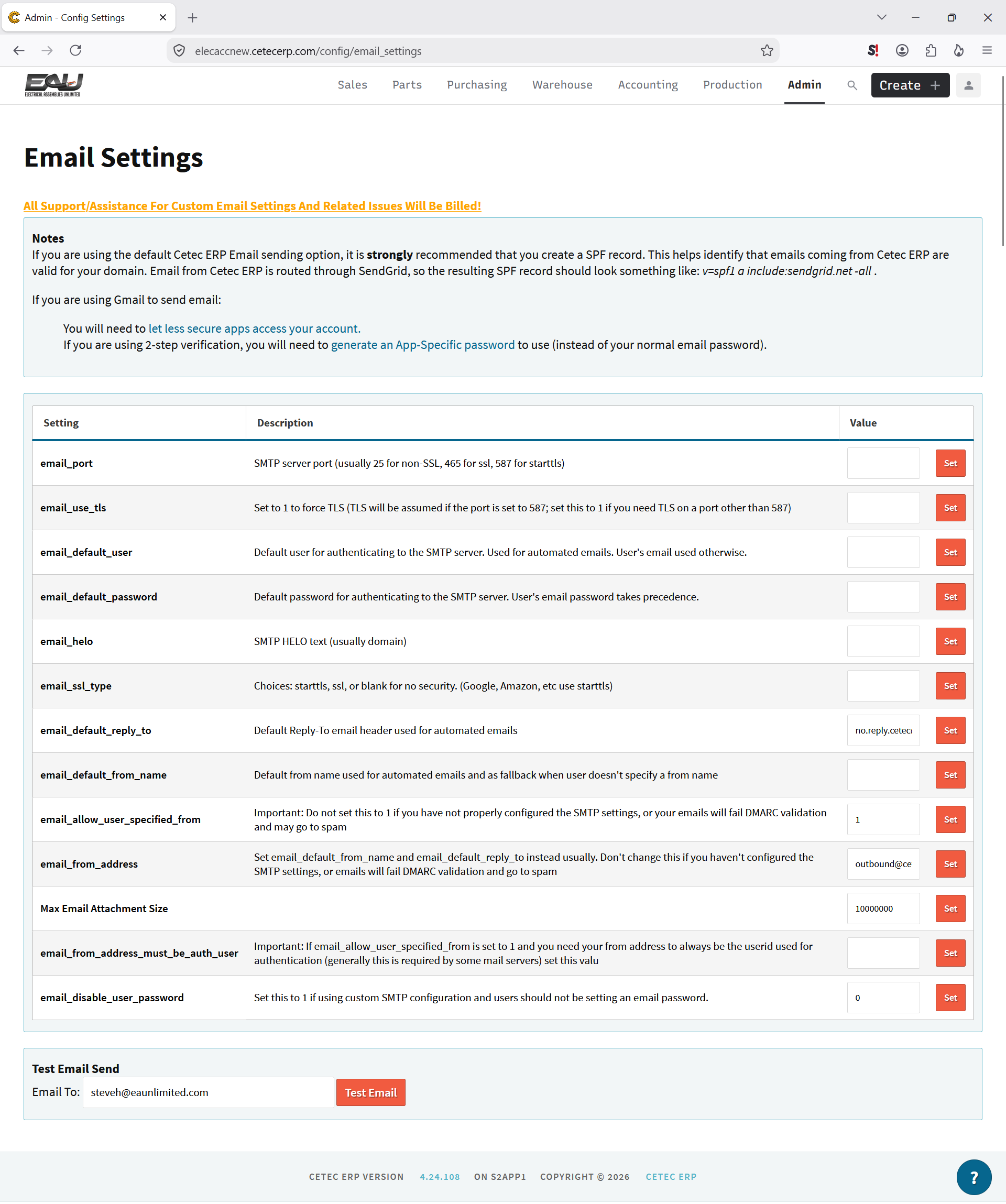
Can we get some help with this issue please? The email settings page that was linked does not seem to contain any field for the email server address. Where do we put that in?
Hey Kris,
You can input the email server address into the email_host field (should be the first option in your email settings config page).
Try inputting that there and testing the email process at the bottom of that page via the Test Email Send field.
Keep me posted on if that corrects your problem.
Thanks,
Cetec ERP Support
@cetecerp21 Please take a look at the screenshot I included with my reply on September 23, where I said that field does not exist. There is no field named email_host anywhere on that page. Please help us resolve this absence.
Hey Kris,
Give this specific config setting a try - I was able to locate the email_host config directly in your config settings page – Cetec ERP
Try establishing your email server there and let me know if that gets you what you’re needing.
Thanks,
Cetec ERP Support
@cetecerp21 Thank you. That link worked to show the otherwise hidden “email_host” field, and I was able to configure the email relay. No further help is needed with this matter at this time.
I am unsure why the “email_host” field is not visible on the email settings page, since it is essential to setting up any third-party mail relay. It would be a good idea for the development team to examine the code for the email settings page and make sure that field gets displayed as it should.