We are unable to edit the descriptions of some parts in the new interface. It takes the update button click but doesn’t update or give a confirmation. The legacy interface works as expected
Hey Bill,
Welcome to the community forum by the way!
I have a request here for you - could you send over one of the parts that is not taking the ‘description’ update request, along with the description you’re trying to input into that part record?
I’m going to try adding that into the prcpart via it’s edit page, while running some checks on the request into the system to see why that’s not updating it as expected.
Thanks,
Cetec ERP Support
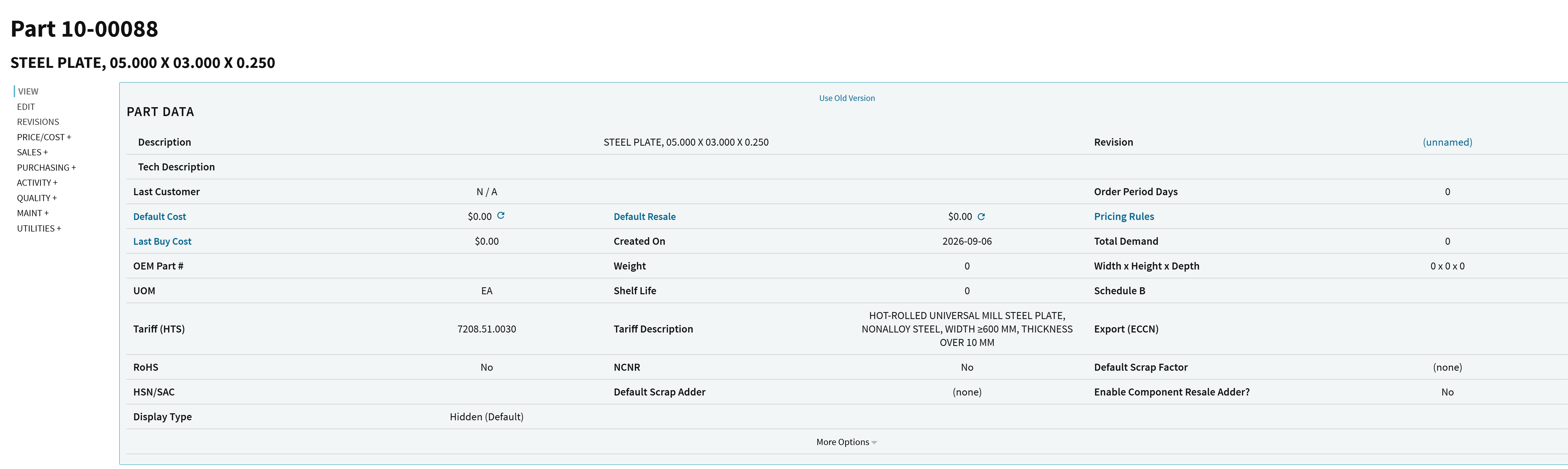
I don’t recall exactly what we were changing, but I just attempted to take “STEEL” out of the description on this item with the new interface, and it never updates or errors. Works fine in the old screen. The new interface acts like it’s not seeing the changed field so it doesn’t post.
Hey Bill,
Could I get approval here to remove ‘Steel’ from that specific prcpart’s description field? I want to test through this with tools pulled up so I can review why the system isn’t picking up on that.
Also to clarify, you’re referring to the actual ‘Description’ field and not another description field such as Tech Description correct?
Thanks,
Cetec ERP Support
Sure, just put it back when you’re done. And yes, it’s the primary description field.
Hey Bill,
Thanks for the approval there - I was able to isolate the error that’s populating when trying to edit the prcpart description field in the new/react version.
I’ve got this over to the engineering team, and will be in touch with an update once that’s been resolved.
Thanks,
Cetec ERP Support
Hey Bill,
I have a verdict here on what was causing the error when trying to edit that specific part record (and others with that same issue).
There’s a specific character you have established in the Tariff Description field that’s blocking updates to that part via the new version of the record. Specifically speaking, this character:
WIDTH ≥600 MM
The less than or equal to character in the tariff description field is the root cause of the problem you’re running into. If you want to keep that in place, you’ll need to utilize the ‘old version’ of the part record edit page. If you’d rather utilize the new version, just remove the less than or equal to character (or replace it with the typed out instance) , and try updating the description field. That should work after removal.
Thanks,
Cetec ERP Support