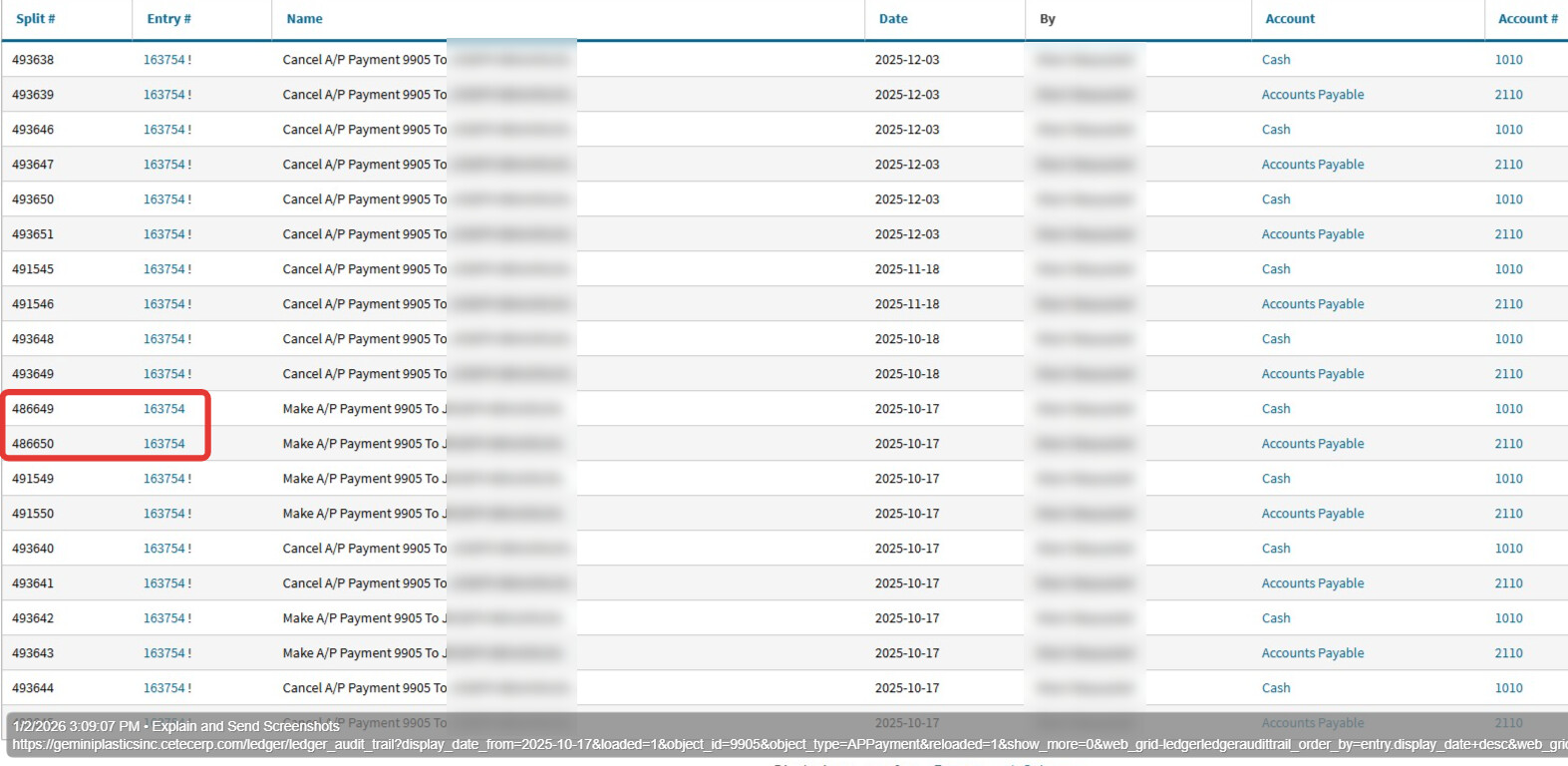
Steps to clear up the AP Payment stuck on the acct reconcile 122:
-on acct reconcile 122, click the Open button (it will retain all the checked boxes…)
-in the payments list on 2025-10-17, you will see both AP Pmt 9905 & non-system “check” ACH pmt for $7K right next to each other…
-uncheck the reconcile box on the non-system “check” ACH payment and leave acct reconcile tab open
-go to Check 11063 (7074) (open in NEW TAB) and Cancel Check, making sure the Value is zeroed out
-go back to acct reconcile 122 tab and click Update, which will refresh the page
-scroll down to AP Payment 9905 and check the reconcile box and update again, making sure that the acct rec 122 is again -0- delta; if so change the status to ‘Closed’. Then check that the non-system “check” for $7K is not listed in the Unreconciled listing at the bottom of the acct reconcile.
Let us know if you have further questions or need further assistance.
Would this be easier to discuss on a phone call? I am familiar with the steps above and had taken these steps before posting. The AP Payment 9905 was showing a bad date, which I tried to fix with the steps I normally would - but it just kept creating one additional entry with a bad date. So I zero’ed the AP Payment and closed it out here: Cetec ERP
But still when I run the AP Validation report today, it still says in the Payments section Bad Amount! AP Payment 9905 Cash + Discount Amount - Debit Memo Amount: 0 G/L Amount: 14000.00000000 here: Cetec ERP
And at the bottom of our bank reconciles, the deleted AP Payment 9905 is still hanging as Un Reconciled even though it is closed: Cetec ERP
The check you mentioned I created to ensure this payment was recorded in some way. I do not want to delete that check. It is not a check created by AP Payment 9905.
I’ve never had a problem like this before and can’t think of any way to get rid of this because it is showing closed. Please feel free to email or call if it would be easier to talk through. Thank you, ~Sherri
I will take a look at this and see what I can do to get this resolved for you. It may not be till Friday afternoon, and if we need to we can certainly do a call. I’ll know more when I take a look at the data and will reach out again on Friday…if you are out on Friday then definitely Monday Jan 5th.
I do think it likely has something to do with there being a cancel AP Pmt with a current date that is hung up, causing that AP Pmt to still appear as unreconciled…
Thank you! I am here today and Monday. I do wonder if a different browser I was using was part of creating the issue. I’ve fully switched over to Chrome now.
The reason why it was thought best to use AP Payment 9905 as the object available to reconcile on the Oct 2025 Acct Reconcile is due to connection to a Voucher being paid. the non-system check/ACH will not clear a Voucher in the AP aging…is there still an Open Voucher for October? If there is not then there is no AP aging issue to worry about and I can just ask engineers to inactivate the remaining Active entry splits for AP Pmt 9905…
Just an update: I re-tested steps I sent previously in test environment and the issue did not resolve fully. While the acct reconcile corrected and no longer had the additional AP Pmt 9905, the 1010 Cash GL account ledger was off from cleared balance in acct reconcile by the amount of AP Pmt 9905 due to a Reversal Reversal AP Pmt currently in the ledger, entered on 2025-10-18. And so engineers will take a look… but it is possible this may be billable to fix. They will respond on the ticket as to that determination and send estimate if that is the case.
I believe we have found a simple solution to resolve this ticket. I am testing this morning to be sure this works as expected and will get back to you shortly.
Update on this issue is coming to you in direct email on support ticket. There is a solution for you, but it is not as simple as first thought. The solution involves steps you must take to resolve in production with specific instructions/guidelines.
The simple solution engineers initially assisted with in testing resolved part of the issue but due to multiple additional problems with data cancels/reversal-reversals, the duplicate payment on the account reconcile issue resolved, but left a directly related AP GL account balance variance with the AP aging summary, which the new steps being sent on the support ticket email will fully address. It is understood that you prefer to keep the one-off ACH payment in lieu of the AP Pmt 9905, however, testing has found that AP Pmt 9905 is so mired in multiple Make/Cancel AP Pmt activity that, even with the current steps to be taken, the only way to neutralize AP Pmt 9905 is for that to be the transaction that is cleared on Acct Reconcile 122, and therefore also having to Void the one-off ACH pmt instead. Documenting internally can help explain the need for this so it is not thought that this will be an “audit” issue if adequate documentation is maintained.
As this is user activity related, rather than a bug, for engineers to actually find the one ledger split (out of many suspects) that is causing AP Pmt 9905 to hang on the account reconcile and make it inactive would involve at least one if not several hours in billable engineering time finding/making that change and then monitoring to make sure there are no unintended outcomes in your production resulting from that type of change.
We hope you understand where solution to this issue has had to land. Follow up ticket email is on it’s way. Certainly if you have any trouble with the steps/instructions, just reply on the support ticket email for assistance from the accounting team.
This morning I had no distractions and time to carefully work through the meticulous and detailed steps provided and it appears it was effective. Thank you for creating a solution. You made me work for it. I had hoped getting to the point where I could forget about it would be easier than that haha. Grateful to be done with it, though!
To prevent this in the future… The purpose of the action taken that caused the issue was not to cancel an A/P payment, but to correct a bad date on the AP Validation report. Each attempt created another line with another bad date to the point that it seemed that the best approach would be to cancel and start over. I’m not sure if that was related at all to the browser in use, but I would welcome any tips on bad date corrections for the future. I’ve corrected them in the past without issue, but it did not seem to be correcting as it had in the past this time around. Thanks again!
I’m glad that this was an effective solution, but sorry it was a difficult process! Thank you for your patience as we worked through this.
It is thought that it was that last “Reversal Reversal” entry that resulted in being unable to fully cancel the AP Pmt on the Voucher as well as that also making the other ledger splits with bad dates unreachable to change the dates to all line up with the original Make AP Pmt date. We typically discourage reversing a Reversal entry as it often does not end well. :-/
Since the system, by design, makes a Post on Date of “today” in order to protect the prior period data (which is often appropriately locked and would block a prior period date default), when a user Re-Open’s a prior period closed AP Pmt (true of AR Pmts as well), then closes making payment again, if the goal is to keep the activity in the prior period, go to the ledger of the AP pmt and view Inactive entries and change the date of the Cancel/Reverse to the prior period date and Update, then Make Payment again and update the ledger date to the prior period as well, as needed.
Certainly reach out to us again if you find you have a similar situation recurring in your production.