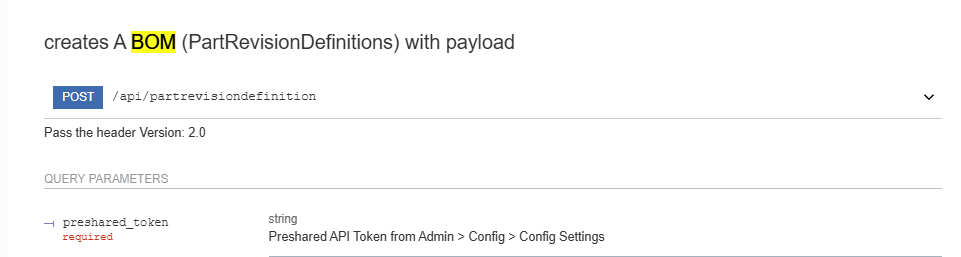
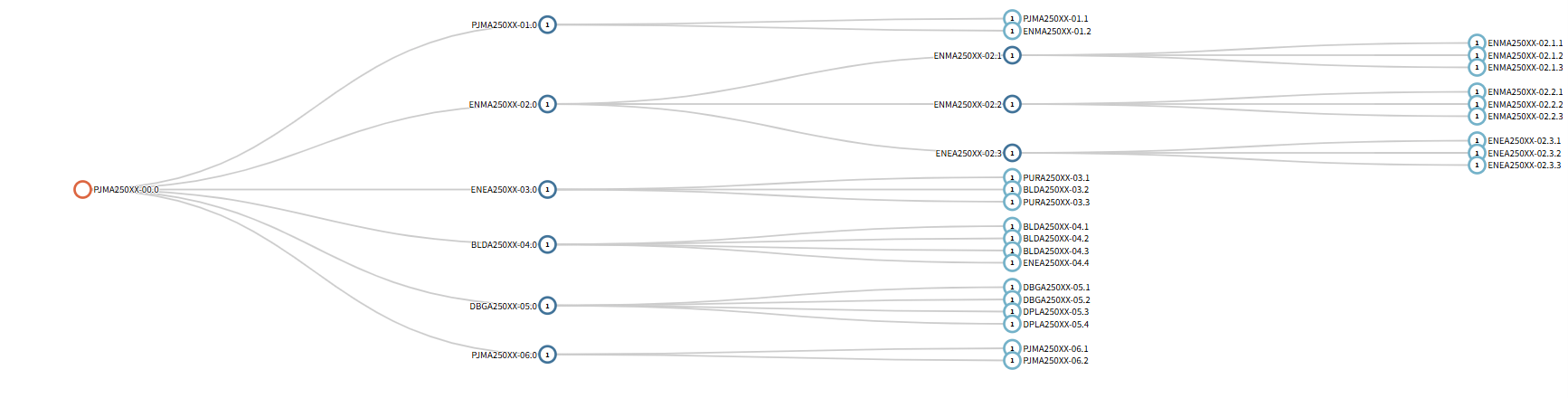
Which API would I use to create a part with a structure like this (photo)
Is it this one ? (photo)
Yes, the PartRevisionsDefinitions table is the table you’d need to get data from in order to create a multi-level BOM tree like that.
Note that you’d likely have to do a “self join” within the data… each BOMComponentRow references a parent ID, which (if it’s a subassembly) may itself have its own row of BOMComponent data.
Let us know if that makes sense or if you have any further questions!
Thanks!
Hi,
I just created a BOM like that yesterday via the API.
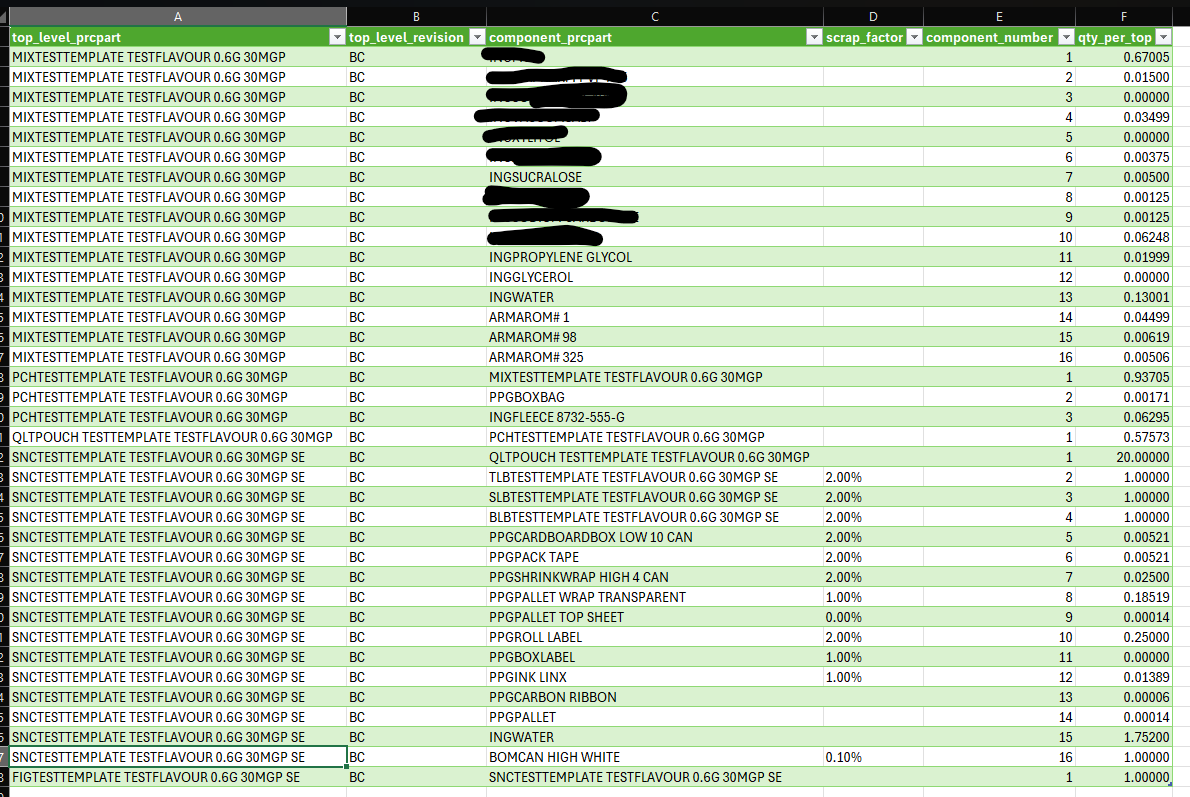
I made a small VBA script so that I could pull the data directly from the excel sheet.
So this is my excel table.
You need to send the subassemblies over the API one by one in order to build the structure you want. i.e you cannot build one giant JSON string that contains it all (or at least I could not get that to work)
Now your json string should look something like this (or as many bom_definitions as you need for each subassembly)
{
  "bom_definition": [
    {
      "comp_num": 1,
      "component": 1,
      "locations": [
        {
          "build_order": 0,
          "operations": [
            {
              "instructions": [
                "string"
              ],
              "operation_external_key": "Dont know where to find this yet so i leave it empty",
              "place_in_line": 0,
              "repetitions": 0,
              "setup": false
            }
          ]
        }
      ],
      "pick_comments": "pick_comments Pick Length if you want it",
      "ordline_status_id": "Use the OrdlineStatus (Work Location) table",
      "prcpart": "SUB2",
      "qty_per_top": 1.2,
      "revision_text": "A",
      "sourcing": "Dont know what this is for"
    },
    {
      "comp_num": 2,
      "component": 2,
      "locations": [
        {
          "build_order": 1,
          "operations": [
            {
              "instructions": [
                "Perform quality check"
              ],
              "operation_external_key": "Dont know where to find this yet so i leave it empty",
              "place_in_line": 1,
              "repetitions": 1,
              "setup": false
            }
          ]
        }
      ],
      "pick_comments": "Check for defects",
      "ordline_status_id": "Check status in the system",
      "prcpart": "SUB3",
      "qty_per_top": 2.0,
      "revision_text": "B",
      "sourcing": "Sourcing information for SUB3"
    }
  ],
  "comp_num": 1,
  "component": 1,
  "pick_comments": "pick_comments Pick Length if you want it",
  "prcpart": "SUBPARENT",
  "qty_per_top": 1.2,
  "revision_text": "A",
  "sourcing": "Dont know what this is for"
}
Now you start by sending this first part to the API.
And then if you need the parent to also be a sub assembly you create a new json string
{
  "bom_definition": [
    {
      "comp_num": 1,
      "component": 1,
      "locations": [
        {
          "build_order": 0,
          "operations": [
            {
              "instructions": [
                "string"
              ],
              "operation_external_key": "Dont know where to find this yet so i leave it empty",
              "place_in_line": 0,
              "repetitions": 0,
              "setup": false
            }
          ]
        }
      ],
      "pick_comments": "pick_comments Pick Length if you want it",
      "ordline_status_id": "Use the OrdlineStatus (Work Location) table",
      "prcpart": "SUBPARENT",
      "qty_per_top": 1.2,
      "revision_text": "A",
      "sourcing": "Dont know what this is for"
    },
    {
      "comp_num": 2,
      "component": 2,
      "locations": [
        {
          "build_order": 1,
          "operations": [
            {
              "instructions": [
                "Perform quality check"
              ],
              "operation_external_key": "Dont know where to find this yet so i leave it empty",
              "place_in_line": 1,
              "repetitions": 1,
              "setup": false
            }
          ]
        }
      ],
      "pick_comments": "Check for defects",
      "ordline_status_id": "Check status in the system",
      "prcpart": "SUB4",
      "qty_per_top": 2.0,
      "revision_text": "B",
      "sourcing": "Sourcing information for SUB3"
    }
  ],
  "comp_num": 1,
  "component": 1,
  "pick_comments": "pick_comments Pick Length if you want it",
  "prcpart": "PARENTPARENT",
  "qty_per_top": 4,
  "revision_text": "A",
  "sourcing": "Dont know what this is for"
}
And you continue to do so until you reached the top assembly.
If you plan to use excel to build your BOM’s I can share the VBA code with you if you do not want to struggle to build out the json structure in VBA.
Now I would argue that it would have been better if they had swapped the order of the data around.
So they started with the parent and added the array with bom definitions at the end.
So it looked like below.
I find it easier to think in terms " I have a parent with an array of bom definitions"
instead of these bomDefinitions belong to a parent.but that is a separate subject.
```
{
  "comp_num": 1,
  "component": 1,
  "pick_comments": "pick_comments Pick Length if you want it",
  "prcpart": "SUBPARENT",
  "qty_per_top": 1.2,
  "revision_text": "A",
  "sourcing": "Dont know what this is for",

  "bom_definition": [
    {
      "comp_num": 1,
      "component": 1,
      "locations": [
        {
          "build_order": 0,
          "operations": [
            {
              "instructions": [
                "string"
              ],
              "operation_external_key": "Dont know where to find this yet so i leave it empty",
              "place_in_line": 0,
              "repetitions": 0,
              "setup": false
            }
          ]
        }
      ],
      "pick_comments": "pick_comments Pick Length if you want it",
      "ordline_status_id": "Use the OrdlineStatus (Work Location) table",
      "prcpart": "SUB2",
      "qty_per_top": 1.2,
      "revision_text": "A",
      "sourcing": "Dont know what this is for"
    },
    {
      "comp_num": 2,
      "component": 2,
      "locations": [
        {
          "build_order": 1,
          "operations": [
            {
              "instructions": [
                "Perform quality check"
              ],
              "operation_external_key": "Dont know where to find this yet so i leave it empty",
              "place_in_line": 1,
              "repetitions": 1,
              "setup": false
            }
          ]
        }
      ],
      "pick_comments": "Check for defects",
      "ordline_status_id": "Check status in the system",
      "prcpart": "SUB3",
      "qty_per_top": 2.0,
      "revision_text": "B",
      "sourcing": "Sourcing information for SUB3"
    }
  ],
}
Good luck
// H
Here’s the json dict that lets you do it all in one shot. If the parts don’t exist, it will create them. I am putting the description field in there, but it will be ignored.. none of the new parts will have descriptions. You’ll need to add them later.
{
    "prcpart": "BOMPARENT",
    "component": 1,
    "revision_text": "A",
    "description": "PARENT BOM",
    "qty_per_top": 1,
    "bom_definition": [
        {
            "prcpart": "ASMCHILD",
            "component": 1,
            "revision_text": "A",
            "description": "CHILD ASSEMBLY",
            "qty_per_top": 1,
            "bom_definition": [
                {
                    "prcpart": "PRTGRANDCHILD",
                    "component": 1,
                    "revision_text": "A",
                    "description": "GRANDCHILD ASSEMBLY",
                    "qty_per_top": 8
                },
                {
                    "prcpart": "PRTGRANDCHILD2",
                    "component": 2,
                    "revision_text": "A",
                    "description": "GRANDCHILD ASSEMBLY 2",
                    "qty_per_top": 8
                },
            ]
        },

    ]
}
Not sure which language you are using for your code. Here’s some python code, where baseurl is your company’s url to access cetecerp, token is the api token, and bomdata is the dictionary above:
    headers = {'content-type': 'application/json', 'Accept-Charset': 'UTF-8', 'version': '2.0'}
    url ='{baseurl}/api/partrevisiondefinition/?preshared_token={token}'.format(baseurl=baseurl, token=token)
    r = requests.post(url, json=bomdata, headers=headers)
Beware, it can take a long time to complete if it is a large BOM. Sometimes it can stall too.
Hope this helps. Best of luck.
Hi Vikas,
Thanks for sharing that.
I must have made something wrong when parsing the JSON then.
But now that I know it works maybe my patience will hold up and I can succeed on my second try..
This topic was automatically closed 90 days after the last reply. New replies are no longer allowed.