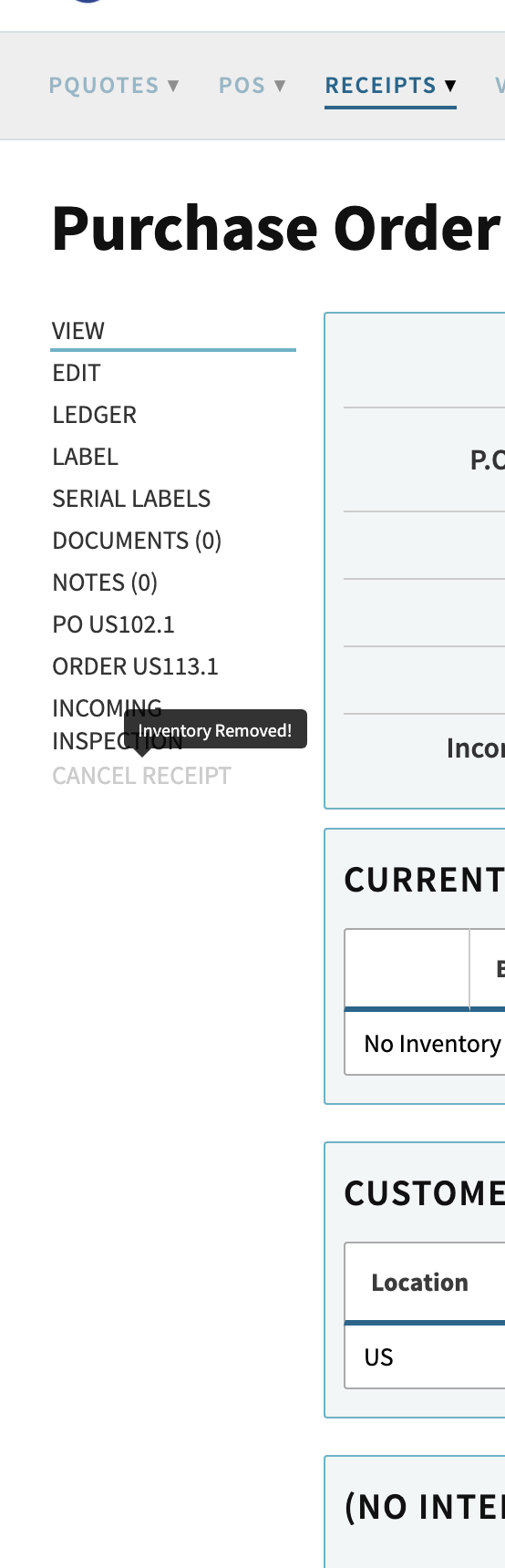
I’m having trouble canceling a purchase order receipt and I think there may be a stuck backend reference.
Details:
Receipt ID: 217
PO Number: 6.1
Part: RAW211348
Location: US
What I’ve already done:
Uninvoiced the related customer invoices (8.1-21, 8.1-22, 8.1-23, 8.1-24, 8.1-25) and dekitted / unshipped the lines that were using this receipt.
Cleared on-hand inventory for RAW211348 down to zero.
Reopened PO 6.1 so it is not blocking changes.
Verified there are no AP vouchers tied to PO 6.1.
In the General Ledger, I found FIFOIX entries for Receipt 217 and changed them from Active to Pending so they no longer appear in the active GL list. After doing that, the Ledger link disappeared from the Purchase Order Receipt 217 screen.
Current behavior:
Receipt 217 still shows in the PO and in the Receipts menu.
The Cancel Receipt option on the Receipt 217 screen is still disabled (greyed out), even though there are no visible shipments, no stock, no invoices, and no visible GL entries left tied to this receipt from the UI.
Could you please:
Check for any remaining backend links (FIFO cost layers, inv_layer / inv_tx references, or other receipt-layer mappings) associated with Receipt ID 217, and
Clear whatever is still referencing it so that the Cancel Receipt action is enabled again?
Provide instructions on how to do so.
If you need screenshots of the PO, Sales Order, Receipt 217, or my GL search, I can provide those as well.
I looked at Receipt 217, and here’s what’s going on. The “Cancel Receipt” button is greyed out because Cetec only lets you cancel a receipt if there’s still inventory tied to it. Since the on-hand quantity for RAW211348 is already zero, the system sees nothing to cancel, even though the FIFOIX entries in the GL were moved to pending. Once inventory is removed at the bin/receipt level, Cancel Receipt just won’t activate.
From a practical standpoint, Receipt 217 is already “effectively canceled.” There’s no inventory, no shipments, and nothing active in the GL. It’s still visible in the system, but it isn’t impacting operations or finances.
If you want to formally cancel it through the UI, there are a couple of options:
Temporarily put inventory back - add a small quantity to Receipt 217 in the US location. That will activate Cancel Receipt, which you can then click to cancel the receipt properly. The inventory will drop back to zero automatically.
Leave it as-is - since everything is already cleared, it’s functionally fine.
Manual adjustments - post a journal entry or inventory adjustment if you need a clean GL reversal for reporting or audit purposes.
If you want to formally adjust the GL for reporting or audit purposes, this would involve manual journal entries or inventory adjustments, so it’s something you’d want to coordinate with your CPA or accounting team to make sure it’s done correctly.
The greyed-out button is expected once inventory is gone.
Adding qty back did not allow me to cancel the receipt. The reason I want to cancel, is I miss entered the actual qtys received and this cost issues with accounting. By canceling, it keeps the PO open with qtys to still be received so I can re-enter correctly. Currently I am unable to do this.
Thanks for the follow-up, I know this one has been a bit of a grind, and I appreciate your patience while I dug in deeper with engineering.
Here’s where things stand - engineering confirmed that Cetec intentionally blocks “Cancel Receipt” once all inventory tied to that receipt has been removed. At that point, even though the receipt feels like it should be cancelable, the system no longer has an active qty layer to unwind, so the button stays disabled by design.
They also noted that Receipt 217 still has historical RIL (receipt-inventory-layer) references on the backend. Those aren’t harmful, they’re just part of how Cetec preserves the audit trail, but because they exist, engineering can’t simply delete the receipt object outright.
I want to make sure you get a clean, proper resolution here. I’m looping in a couple of our internal consultants who specialize in exception processing so we can determine the best-supported next step, whether that ends up being a temporary add-and-cancel path, leaving the receipt as-is, or another cleanup route they recommend for cases like this.
I’ll come back to you as soon as I have definitive guidance.
I wanted to follow up on the receipt cancellation. After reviewing the situation with consulting, I can confirm that formally canceling Receipt 217 is not possible in the system at this point.
The reason is that Cetec only allows a receipt to be canceled if there is still inventory tied to it. Since you’ve already cleared all inventory for RAW211348, there’s no active quantity layer left for the system to unwind. Even though you’ve removed shipments, invoices, and GL ties, the receipt still has historical backend references (RIL records) that prevent direct deletion. This is by design to maintain a proper audit trail and prevent accidental loss of historical data.
Functionally, the receipt is already cleared (it’s not affecting inventory, shipments, or the GL) but the system will not let it be formally canceled through the UI. If you need a clean GL reversal for reporting or audit purposes, the supported approach would be to post a manual journal entry or inventory adjustment in coordination with your accounting team.
I know this isn’t the ideal “Cancel” button experience, but operationally and financially, everything is already handled correctly.