Good day - I have unticked the column boxes under the options “SET COLUMNS TO SHOW/HIDE”, and the requested +/- for those columns will not be adhered to. I have unchecked the “MERGE” column countless times, among others, and they just keep re-populating on the screen.
Hey Shawn,
I’ve gone into the Parts List Report you linked and hid multiple columns on my end within the +/- options for that report. I was able to successfully hide columns such as Merge, Tech Description, Production Line (just a few examples).
Could you try something here for me? Try clearing out your browsers cache/cookies within your browser settings page. Select either the 7 day or 4 week option - this will log you out - log back in and try hiding those columns again.
If that doesn’t allow you to hide columns on your Part List Report please let me know after that and I’ll see what we can do here for you.
Thanks,
Cetec ERP Support
I have done this and will advise if I see the issue again - Thank you!
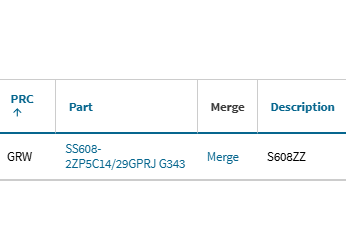
Hey Shawn,
Thanks for confirming that didn’t work for you regarding removal of the ‘merge’ column from your report. I’ll get started testing through this in your environment (I’ll also impersonate your user just to double check) and see what we can do here to get this resolved.
I’ll be in touch with an update as soon as I have those details for you.
Thanks,
Cetec ERP Support
Hey Shawn,
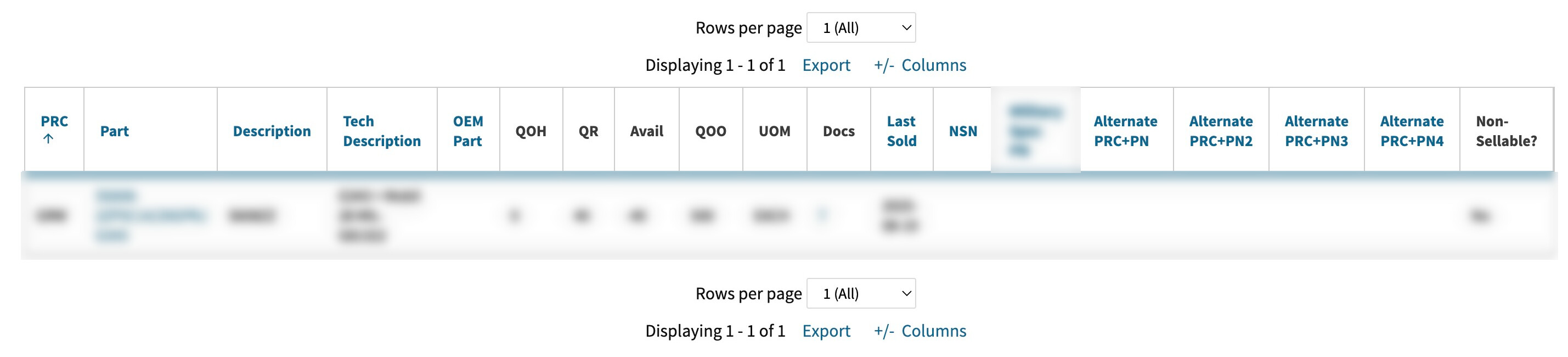
I’ve done some digging around here while impersonating your profile in your environment. I’ve gone to quite a few reports and hidden some columns, rerun the reports, and validates they’re indeed not showing anymore.
Of course, those columns that were hidden were set back to show by myself manually… as it stands though I can’t seem to reproduce this particular issue on my end:
Is there any way we could hop on a call tomorrow or Friday sometime between you and myself so I can watch this happen in real time? If I can get on a screenshare call I can record the meeting and utilize this with the engineering team to get this resolved for you and the users who are experiencing this problem.
Thanks,
Cetec ERP Support
Good morning,
We are still experiencing this “merge” intermittently. I try and time it, track it, and I cannot figure out why sometimes it populates and others it’s not preset. This link has been unticked over and over, and the “merge” comes back with a refresh of the window. It is now on the far right side.
Hey Shawn,
I’ve got this reproduced finally while impersonating your profile. Generating a ticket to our engineering team and will work to get this issue resolved.
Also understood you have multiple users with this issue so I’ll coordinate with engineering to make sure this fix impacts the users in question.
I’ll be in touch with an update as soon as engineering has a fix in place.
Thanks,
Cetec ERP Support
Hey Shawn,
Another update here for you - that ‘merge’ column that you’re seeing is one of our ‘action columns’ that can’t currently be hidden. There’s an action tied to that column - the merge function - so that column can be set to ‘hide’ and it’s still going to show.
Engineering is working on potentially allowing that columns to be hidden so it doesn’t populate on the part list report, but they need to evaluate potential impact of this request.
I tested through many of the other columns on the part list report and their show/hide functionality - I’m not seeing the same issue like I am with the ‘merge’ column on the part list. All other columns I tried to either show or hide & refresh the page, kept them in the state I selected.
Thanks,
Cetec ERP Support
Thank you so very much
Hey Shawn,
We have some changes coming in release 4.25 that redo these tables and the prefs. We are addressing the issue, and thank you for your patience while we work through that.
Thanks,
Cetec ERP Support