We have a list of 1000-level component part numbers that we use to create a BOM for each sellable part number.
When we search for sellable part numbers to add them to quotes, the 1000-level non-sellable part numbers are showing in the quote entry lines as well. How could we hide the 1000-level component part numbers in the quote & order entry line fields?
I found the “Non-sellable?” flag in the parts edit - production information setting which looked like exactly what I needed. However, when I check that flag for a 1000-level part number, it still shows up when I perform a part number search in the quote/ order line field.
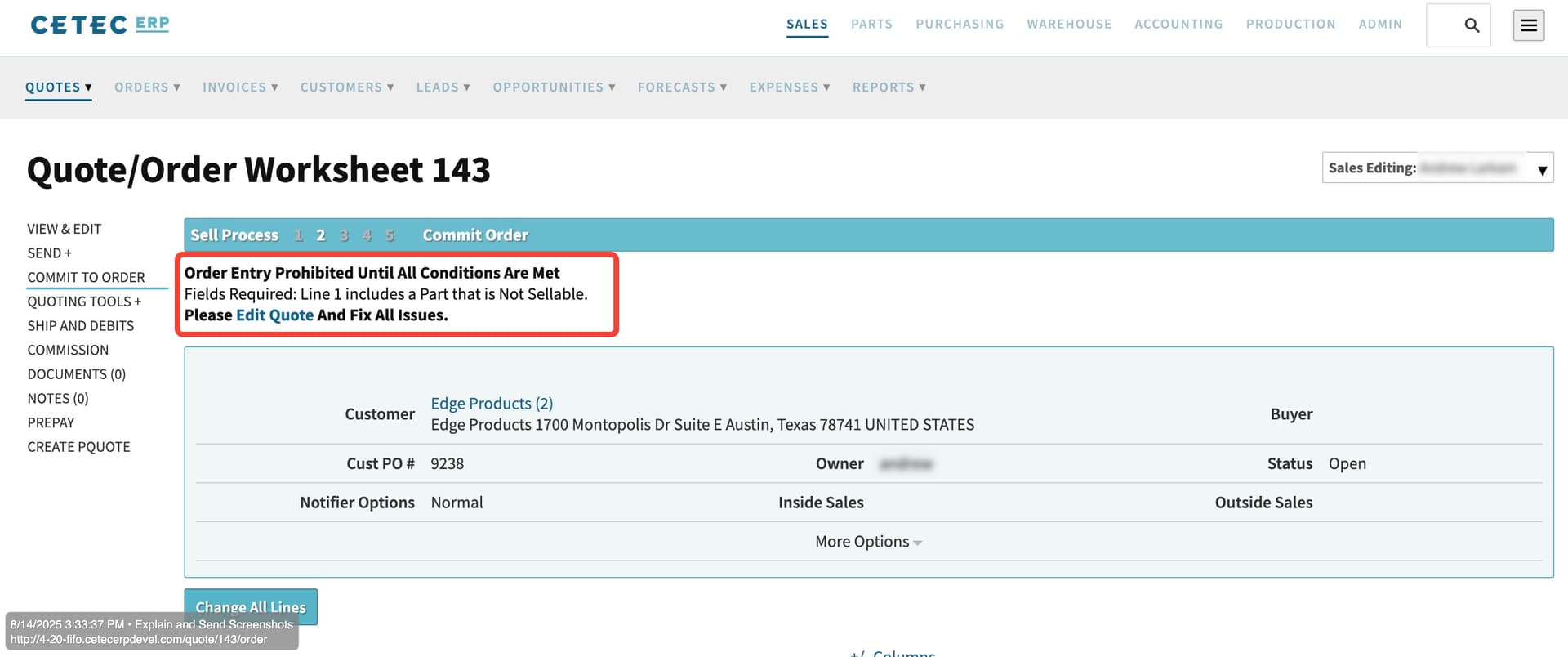
The current purpose of that Non-Sellable flag is to prevent order entry. For example, if you attempt to commit a quote to order with a non-sellable part on the quote, Cetec will block the entry of that order:
The purpose of that flag is not to remove that part from the part search box on the quote. Currently there is no way to hide certain parts from the quote & order entry line fields. I hope this helps clear up that feature.
I will however pass this along to our product management team for review and will let you know if they would consider filtering the quote-line part search by the Non-Sellable checkbox as development. I will let you know as soon as I have an update.
Our Product Development team got back to me on this. They’ve considered this in the past, but ultimately this won’t work because some of our customers create internal build orders for parts marked as non-sellable, so we have to allow for such parts to be searchable on the quote (since the quote is the mechanism for order entry for both internal build-to-stock orders and external sales orders). I hope this explanation makes sense, and thank you for your suggestion. We are always looking for ways to make our product better and we greatly appreciate your feedback.
Please let me know if you have any questions. Have a great day!