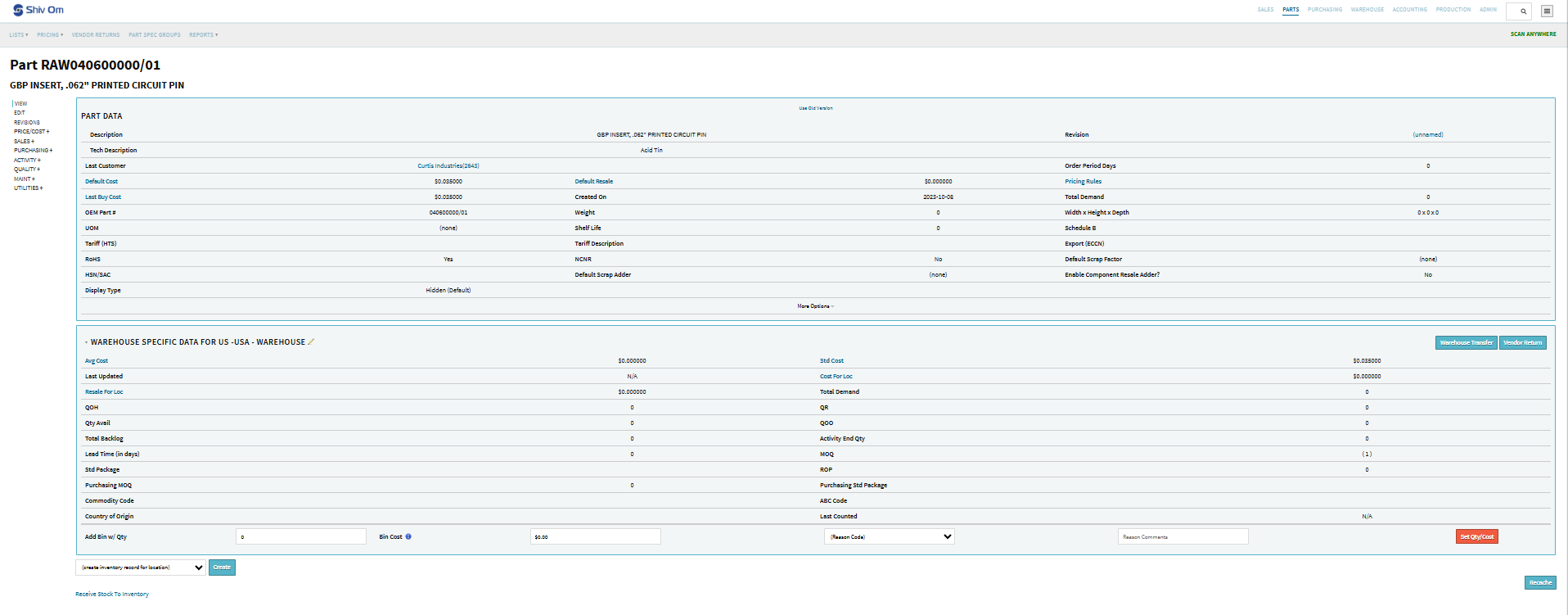
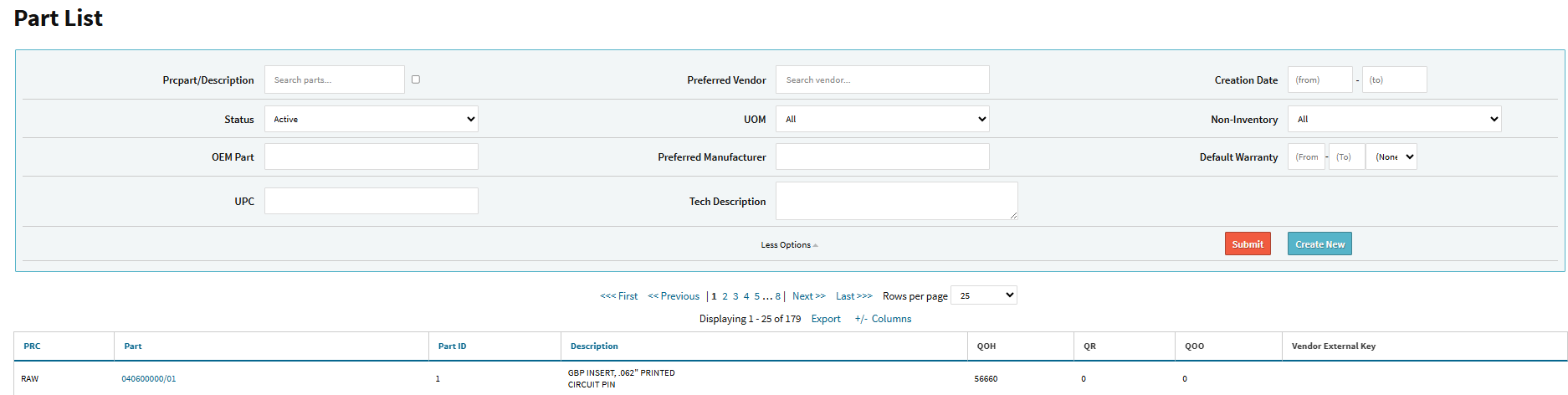
Hi, I am with shivomprecisionusallc.cetecerp. I have Part 040600000/01 showing QOH of 56,660 on the Part List, but QOH is 0 in all visible warehouse records. We previously deleted a warehouse, and I suspect this is an orphaned inventory record tied to that warehouse. Can you please remove the orphaned inventory rows for this part.
Good Morning,
Ahh a deleted warehouse could definitely be leading to this issue.. I can absolutely reach out to our engineering team here to try and get that inventory record cleared out, but please note this would be considered billable engineering time (which I’d be requesting a quote from them on this request).
Please let me know if you’d like me to take this route & I’ll generate the ticket thread on our end.
I do want to pass along some insight here on the process you walked through to make sure this doesn’t happen down the road - if you have a warehouse you’re going to be deleting that you know has inventory in it… it’s best to warehouse transfer that over to one of the warehouses you aren’t removing.
You can then delete out the warehouse without any risk of orphaning off of data in the system (or best practice here would be don’t delete the warehouse & just repurpose it on the data maintenance table).
Let me know how you’d like me to proceed with this.
Thanks,
Cetec ERP Support
Well as matter of fact, This was part of a set up issues when working with your team and they had me delete the warehouse because it needed setup differently. This has been an issue since 2024. Always being told at some point there would be releases upcoming that would give abilities to correct this kind of issues. I do not think we should be billed engineering hours for 30 second job that is an issue your system creates. If the system was going to lock us up this way, it should never have allowed the transaction without transferring the material first. But it did not. I have been incredibly dissatisfied with no only the service support when we have calls that are billed and people come with lack of knowledge on how their system works, but also just the very functionality of the system itself. This is unacceptable. Although you have decent per user pricing, it is becoming more and more apparent the a pricier system with better interface, control, and support may be more of the route we need to take.
1 Like
No comment?
Hey Ray,
We’ll that’s unfortunate you feel that way regarding the support process, and other items in the system. Albeit you’re one of our Lite customers so you don’t technically pay for support (it’s provided for free through the customer forum). We try to get to the customer forum as frequently as we can, but we also don’t provide guarantees on something that is free for you. Any customer who wants dedicated consulting processes or needs our engineering team’s assistance are all charged the same rate.
Addressing the problem here - a deleted a warehouse from your environment. We typically recommend against doing this because of the risk of orphaned data; therefore, I apologize if for some reason you were recommended to do this without advising you of the risk. If this is ever necessary, we advise a best practice of warehouse transferring the inventory from one WH to another in the system if you do indeed need to delete one out.
We also provide an alert at the top of each data maintenance table:
Warning: Removing/Changing data may have repercussions on other related data sets. If you want to modify a row that has been added already, we strongly recommend that you rename the row rather than delete the row - deleting the row could orphan off any related data.

All that said, I think I’ve worked through a way here that doesn’t involve an engineer… this does involve you handling the inventory side of this yourself though (whether you inventory adjust that inventory out of the system, etc etc). If you’d like please work through the steps listed below:
- Go into your LNAME data maintenance table here - Cetec ERP
- Use the ‘Add Record’ button, and add back in the MC warehouse location (all you need to do here is click ‘Add Record’, input MC into the new data row, and then hit Submit).
- This will repopulate the MC warehouse location back on the part record in question, and then you can warehouse transfer that inventory over to your other warehouse.
- Once that WH transfer goes through, go back into your LNAME data maintenance table linked above and remove the MC warehouse location.
- Let me know once that’s completed and I’ll remove the MC location name from the UI for that specific part record for you.
What you’ll have to handle after that’s been completed is in regards to what you want to do with that 56660 units that are now in the other warehouse. You can inventory adjust that out if you’d like (note that will impact the general ledger). You can cycle count that down to 0 as well (which will also hit the ledger).
Please let me know once you’ve worked through the listed steps above, and I’ll handle the removal of the MC warehouse from the part record in question so that’s not visible to you or your users going forward.
Thanks,
Cetec ERP Support
Hello,
This did not work.
Hi Ray,
I think that if you provide a bit more information on what the outcome of your actions led to, I believe that you will get a prompter and more concise answer.
I am not trying to deminsih the frustration you must be feeling, I am not trying to be a besserwisser.
I am simply trying to help you get rid of this problem.
Hey Ray,
You need to change the Location Code on the LNAME data maintenance table from 01 over to MC:
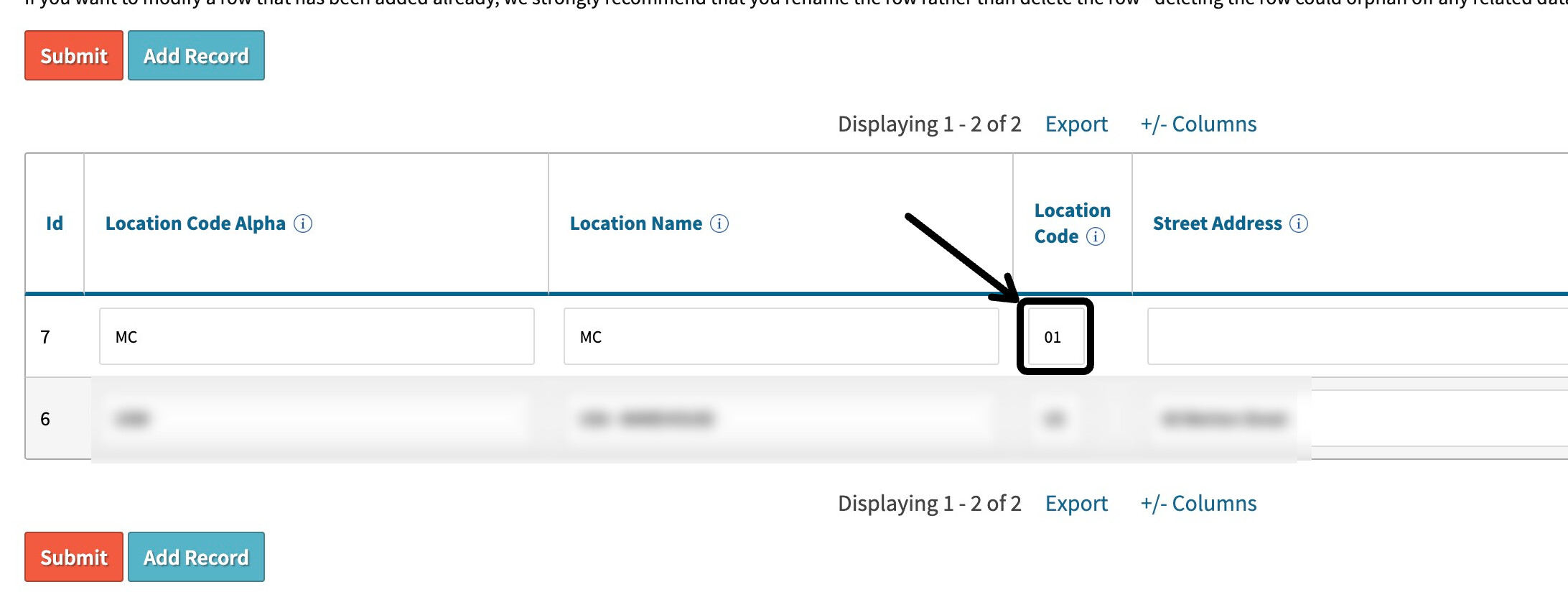
Change that value to MC, and then hit Submit. Then refresh your prcpart page and that part record should now have your MC location available with that inventory record floating in there.
Please let me know if that’s not the case.
Thanks,
Cetec ERP Support
This worked great. Thank you for the help.
Hey Ray,
Absolutely, glad to be of assistance. If you run into any need to delete out another warehouse just make sure to transfer this inventory to the other location before hand. This will keep that data from being orphaned off. This logic is also intact for other data maintenance tables, and if at all possible, it’s highly advised to just repurpose the data row than delete it out.
Have a great rest of your day.
Thanks,
Cetec ERP Support
This topic was automatically closed 90 days after the last reply. New replies are no longer allowed.