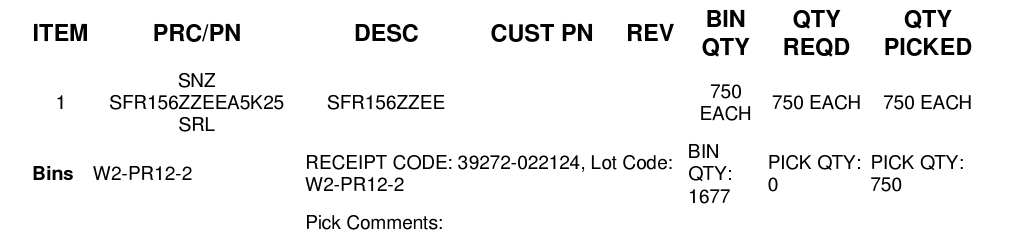
Good day,
The pick ticket still does not have any defining lines to divide/define the columns & rows. This is difficult to work with, especially on multiple-line orders.
Good day,
The pick ticket still does not have any defining lines to divide/define the columns & rows. This is difficult to work with, especially on multiple-line orders.
Hey Shawn,
Thanks for sending this our way - I’ll generate a ticket here on my end to have engineering check into that custom pick list document you have established.
Did those lines get removed when your environment was updated from v4.22 over to v4.23?
Thanks,
Cetec ERP Support
Good day,
Yes, since the update, we are experiencing strange glitches and the grids/borders being omitted on the pick ticket.
Many of us have the issue where when we “untick” column options, they just come back.
Hey Shawn,
I’ve got a ticket input into our system to address the lack of borders & organization around your pick list PDF’s that you’re generating. I want to get that addressed first, I’ll then transition that thread over into the +/- column selections not sticking in your environment.
I’ve been able to reproduce the lack of borders/organization on your pick list PDF’s, but I’m having a much more difficult time reproducing the +/- column selection not sticking issue when impersonating profiles within your environment.
Hang in there - we’re working to get the pick list PDF resolved & +/- column issue taken care of as well.
I’ll be in touch with an update as soon as I have additional details here.
Thanks,
Cetec ERP Support
Anything on this one?
Hey Shawn,
I believe we’ve got that pick list PDF fixed up for you in your live environment - Cetec ERP
Please test through a couple pick list PDF’s for some open orders and let me know if this isn’t the case. Engineering fixed up that custom document for you that was broken due to the update for free. Please keep me posted here.
Thanks!
Cetec ERP Support
Excellent! Thank you, Cetec Talent!
Have a great 4th.
SHBS