Would it be possible to implement the following updates in the two reports:
Currency Indication:
Display the “CAD” currency label only for Canadian customers and vendors. For USD entries, please leave the currency label blank — similar to the current updated format in the A/R List (Receivables) report.
Total Outstanding Amounts:
At the bottom of each report, kindly include the total outstanding amounts, separated into two distinct lines:
CAD $
USD $
Thank you for your continued support — it’s greatly appreciated
I have some questions here regarding the request you’ve sent over (for AR Aging and AP Summary report changes).
On currency indication, you’re requesting that we lave the currency label blank for USD entries - is there a purpose why you’d want those values to not have a representation of dollars for USD entries?
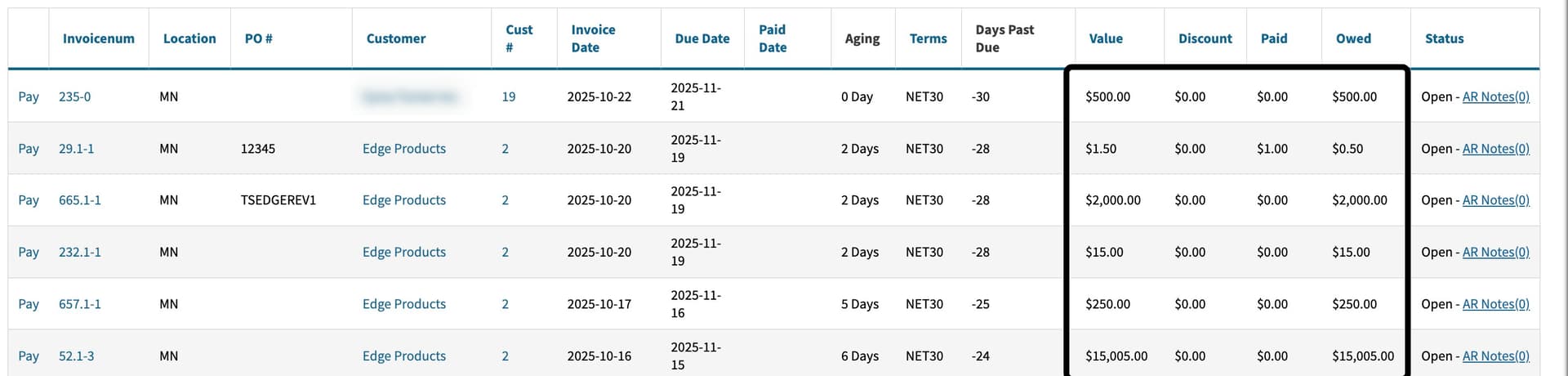
As you can see in the screenshot above our AR List (receivables) is still presenting the actual dollar sign we just removed the USD flag there.
At the bottom of AR Aging and AP Summary reporting, you want an total outstanding amount once for CAD and the other for USD? What would you specify as outstanding values? Greater than 30 days? 90 days and beyond?
I believe there may have been some miscommunication in my previous message, so I’d like to revisit and clarify the request.
We work with both USD and CAD customers and vendors, and we’re looking for consistent currency handling across all relevant reports.
Current Behavior (for reference):
In the Vouchers report, there’s an option to select “All” under Voucher Currency. The report then displays amounts in both CAD (clearly labeled as “CAD”) and USD (left blank), which makes it easy to distinguish between currencies.
Similarly, the Receivables report does not offer a currency selection option, but it still displays both CAD and USD amounts in the same clear format — CAD values are labeled, and USD values are left blank.
For the A/R Aging and A/P Summary reports referenced in the subject line, there is currently no way to view or filter by all currencies — the report must be generated either in CAD or USD, regardless of the default currency set for the customers or vendors.
We kindly request one of the following enhancements for these two reports:
Display each amount in the default currency of the corresponding customer or vendor (just like in the Vouchers and Receivables reports).USD report, for the USD customers and Vendors only
Alternative Option: Provide the ability to generate:
A USD report showing only USD customers/vendors, and
A CAD report showing only CAD customers/vendors.
In Response to Your Questions:
Currency indication: You asked why we prefer to leave the USD label blank. It’s simply for consistency with how other reports (Vouchers and Receivables) currently display the data — with CAD amounts labeled and USD left blank.
Outstanding totals at the bottom:
Yes, we’d like to see a total outstanding amount broken down by currency at the bottom of the A/R Aging and A/P Summary reports.
This would include the total for each column, rather than being based on aging buckets (e.g., >30 or >90 days).
Please let me know if any further details are required.
Thank you for your continuing support, and look forward to your feedback.